
Put a ticket on hold
Beginner 5 minUpdated 22 May 2026
Held tickets let you suspend a sale (customer, lines, amounts) without collecting payment, to resume later. The feature is only available if it is enabled in cash register module preferences.
Drafts appear at the top of the Cash register module (counter such as « N ticket(s) on hold »). The blue button reloads the ticket; the red button deletes it after confirmation.
Important: to close the register, all held tickets must be settled (resumed and collected) or deleted.
Procedure
- Check with an administrator that Held tickets is enabled.
- Build the ticket as for a normal sale (register open, customer, items, totals).
- Click On hold instead of a collection method.
- The ticket appears in the list at the top of the screen.
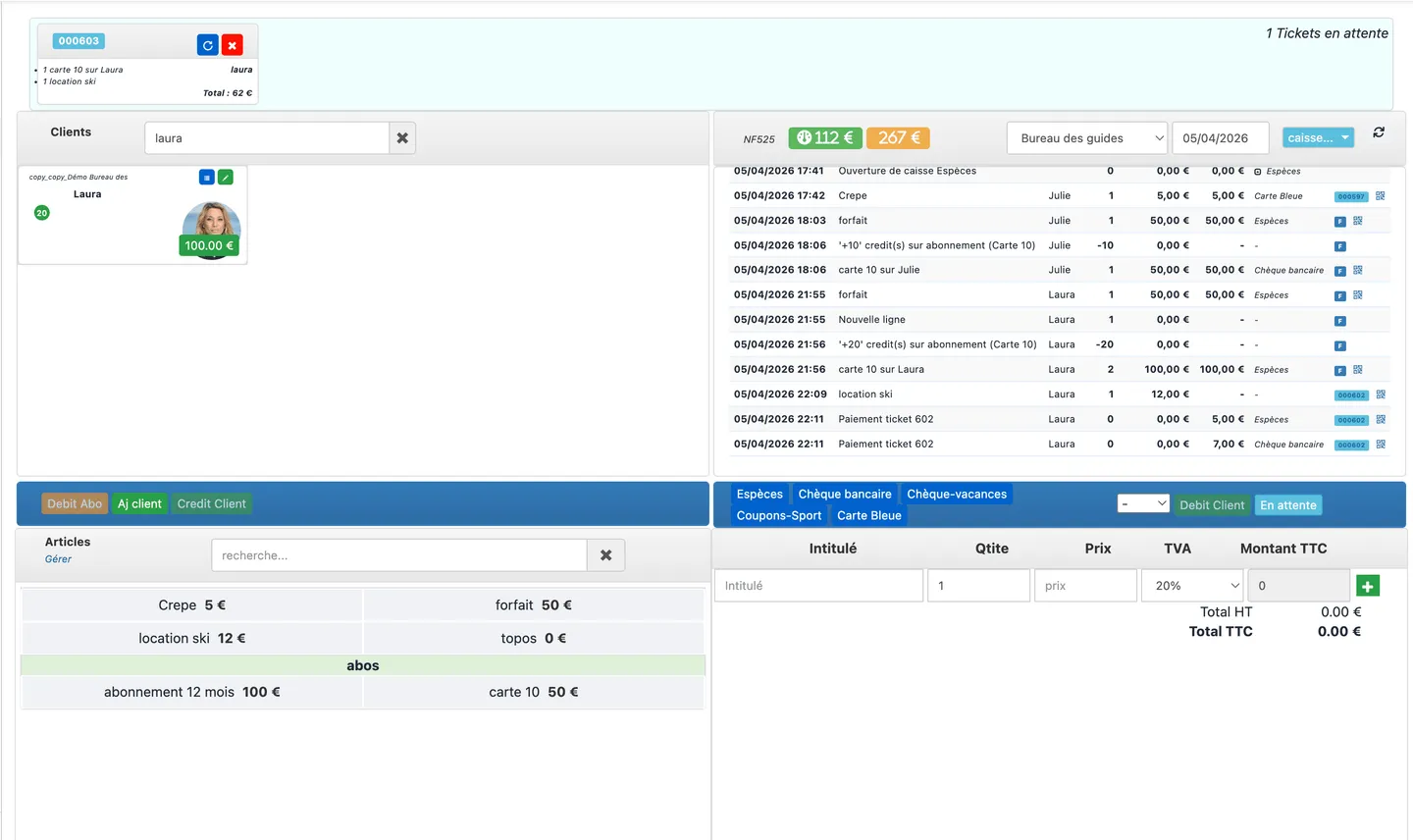
- To resume: blue button for that ticket.
- To cancel: red button, then confirm deletion.
- Before closing: counter at zero held tickets.
Common issues
- On hold missing: option not enabled in preferences — contact an administrator.
- Closing blocked: process each ticket listed at the top of the screen.
