
Sell an item at the register
Beginner 5 minUpdated 22 May 2026
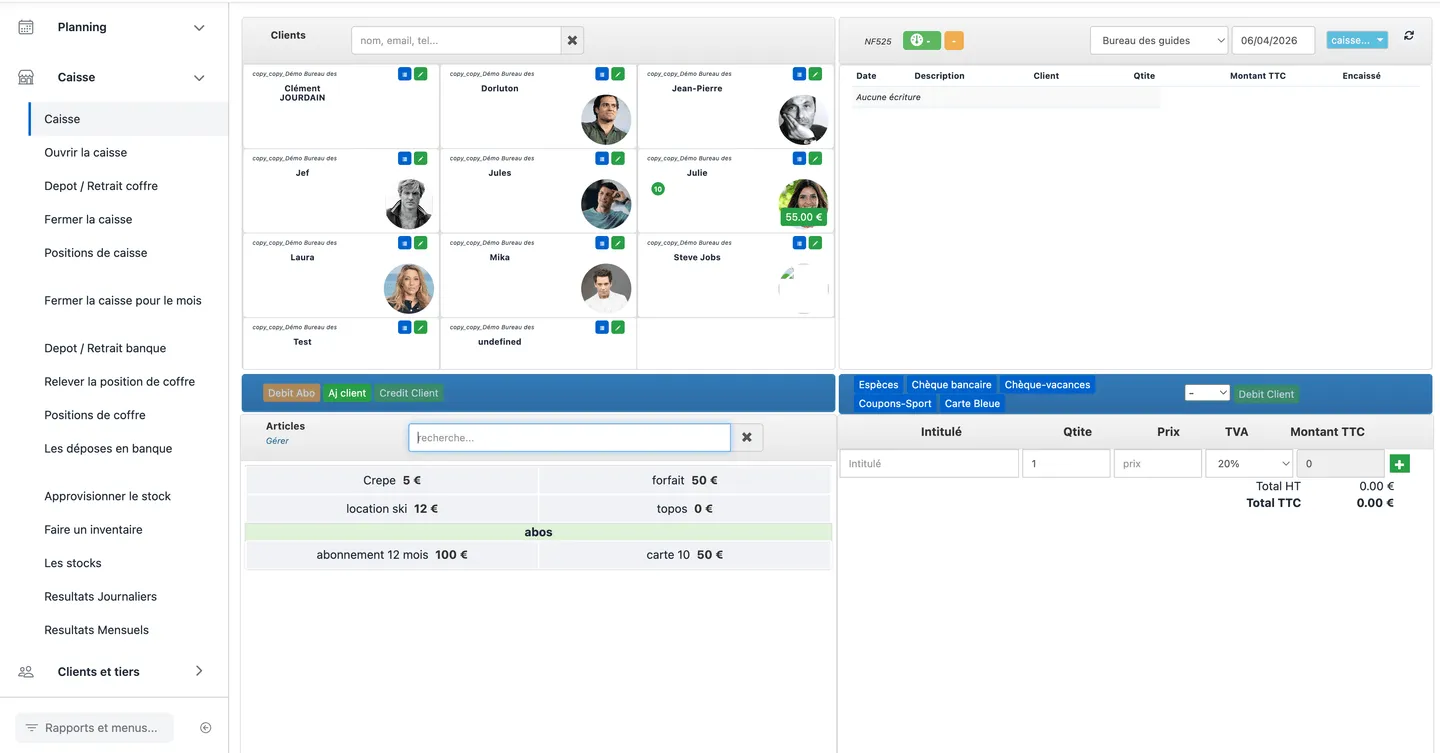
A counter sale is done from the Cash register screen after opening the register. You add items to the ticket, optionally link a customer, then confirm with a collection method.
After confirmation, the entry appears in the day journal (top right). Totals update: day revenue (green indicator) and collections (orange indicator). With NF525 active, an NF525 indicator may appear nearby.
Procedure
- Check that the register is open and the journal date matches the sale.
- Optional — select a customer in the left panel.
- Under Items, click the item (or package) to sell; adjust quantity, price, or VAT if the interface allows.
- Check ticket totals excl. / incl. VAT.
- Click the collection method (Cash, Cheque, Card, etc.).
- Check the journal line and totals update.
- Print or edit the receipt if the interface offers it.
Common issues
- Register closed: perform a register opening first.
- No response on click: check Finances permissions, register / establishment, and journal date.
For a sale on customer account with deferred payment, see Collect payment with multiple methods.
