
Subscribe, suspend, and reactivate your account
This guide covers your organization’s Activiteez account (paid LIGHT, PRO, BUSINESS, SÉRÉNITÉ plan, etc.), not your personal user account. You can subscribe, suspend temporarily, or reactivate your subscription from Settings, without contacting support.
Open the subscription block
- Sign in at Activiteez with your user account.
- Open your organization’s Activiteez account.
- Go to Settings → Account.
- Find the Subscription box (current plan, expiry or renewal date, SMS credit).
That is where you activate, suspend, or reactivate the paid plan.
Subscribe or reactivate a subscription
If your subscription has expired or you are moving from a free plan to a paid plan, the box shows the expiry date and the green Activate my subscription button.
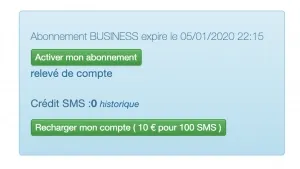
- Click Activate my subscription.
- You are redirected to the payment provider to choose your plan and complete payment.
- Once payment is confirmed, your Activiteez account switches to paid mode with the features of the plan you chose.
The account statement link below the button shows subscription-related transaction history.
Suspend an active subscription
If automatic payment is set up and the subscription is active, the box shows the plan (e.g. BUSINESS) and the date until which it is extended. The orange Suspend my subscription button pauses it.
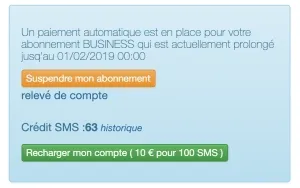
- Click Suspend my subscription.
- Confirm if a confirmation dialog appears.
- At the date shown, the account returns to free mode (GO plan or equivalent for your profile): some paid features are unavailable until you reactivate.
To reactivate after a suspension, use Activate my subscription again as described above.
Note — pricing during a pause
When you suspend your subscription, the rate in effect at suspension is not guaranteed: on reactivation, the plan may be billed at the rate applicable then, which may differ from what you paid before the pause. To keep your current rate, do not suspend your subscription.
Change plan
To move from one offer to another (LIGHT, PRO, BUSINESS, SÉRÉNITÉ), contact Activiteez support: plan changes are not self-service from Settings. State the plan you want and your Activiteez account name — see How do I contact support?.
You can compare offers on the Pricing page. To choose the right account type for your business, see the FAQ Which account type is right for me?.
